
Configuration, Ranges & Routing Stats
Routing Management occupies its own section in the main menu, alongside the protocol and application layer modules.
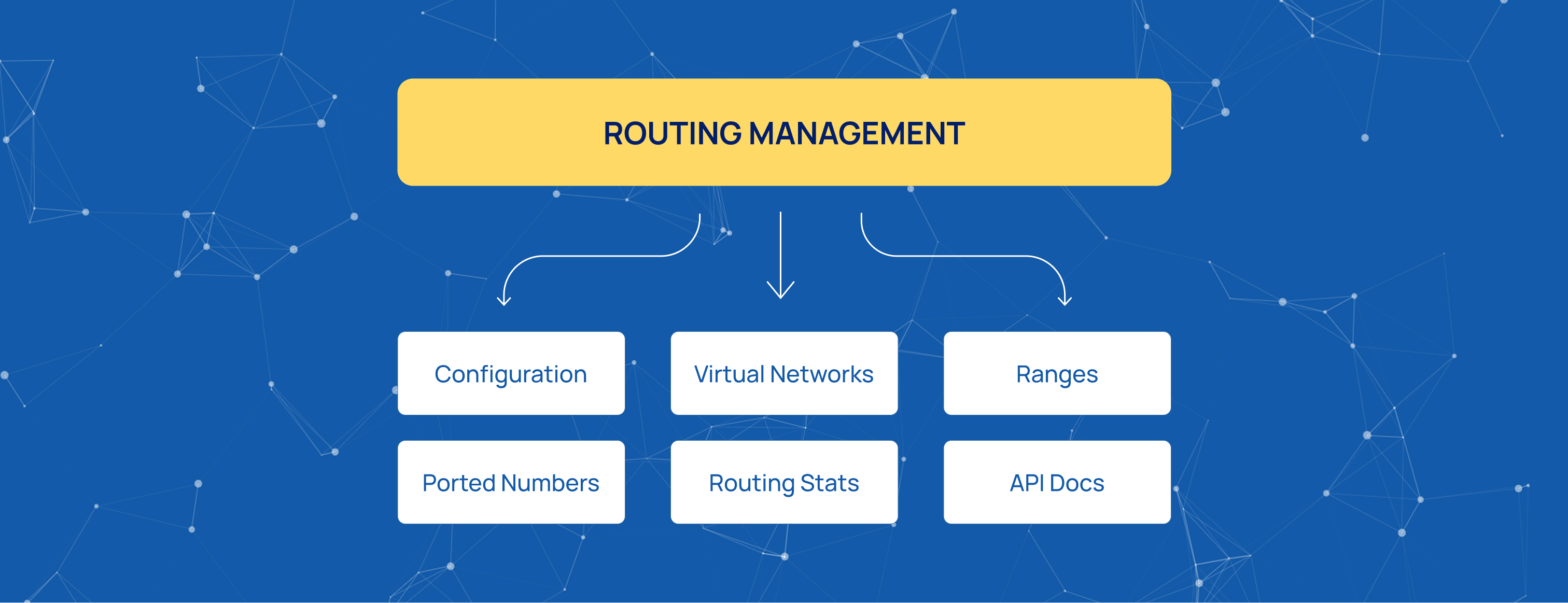
It includes the following pages:
-
Configuration — database connection settings.
-
Virtual Networks — logical routing domains.
-
Ranges — prefix-based routing rules.
-
Ported Numbers — exact-number routing entries.
-
Routing Stats — routing activity monitoring.
-
API Docs — programmatic access to routing data.
Configuration
Configuration comes first because Routing Management stores all routing data in a database and cannot operate without a database connection.
The parameters are the same as those on the Database Configuration page, which describes the setup process in detail.
Available settings include:
-
DB Name — specifies the database name.
-
DB Nature — selects the storage engine: MongoDB or Nitrine.
-
DB Connection String — provides the database connection details.
-
Initial Connections Per Worker — sets the default number of database connections opened by each worker.
-
Max Connections Per Worker — sets the maximum number of connections each worker can open.
After these settings are saved, the system can store routing data.
Virtual Networks
Virtual Networks define logical routing domains, typically one per operator or service region.
The Routing Management concepts section explains what virtual networks are and how they are used in routing decisions.
Each virtual network stores two prefix formats:
-
National prefix
-
International prefix
Ranges
Ranges contain prefix-based routing rules. Each entry associates a prefix with the network to which matching numbers are routed.
When multiple entries match a number, the longest match takes priority. A longer prefix can therefore override a shorter one for a specific subset of numbers without changing the broader rule.
Source-Based Routing
Source-based routing uses the same range entries. Since a range does not have a source field, the destination number must already contain information identifying the source network when the lookup takes place.
The process has three steps:
-
Add a source marker. When traffic arrives from a network, a rule adds a prefix identifying that network to the destination number.
-
Resolve the marked number. A range with the corresponding prefix routes the number to the required network. The marker can also be followed by the first digits of the destination number to restrict the rule to a specific group of destinations.
-
Remove the marker. Before the message leaves the platform, the marker must be removed. Otherwise, the partner receives an invalid destination number.
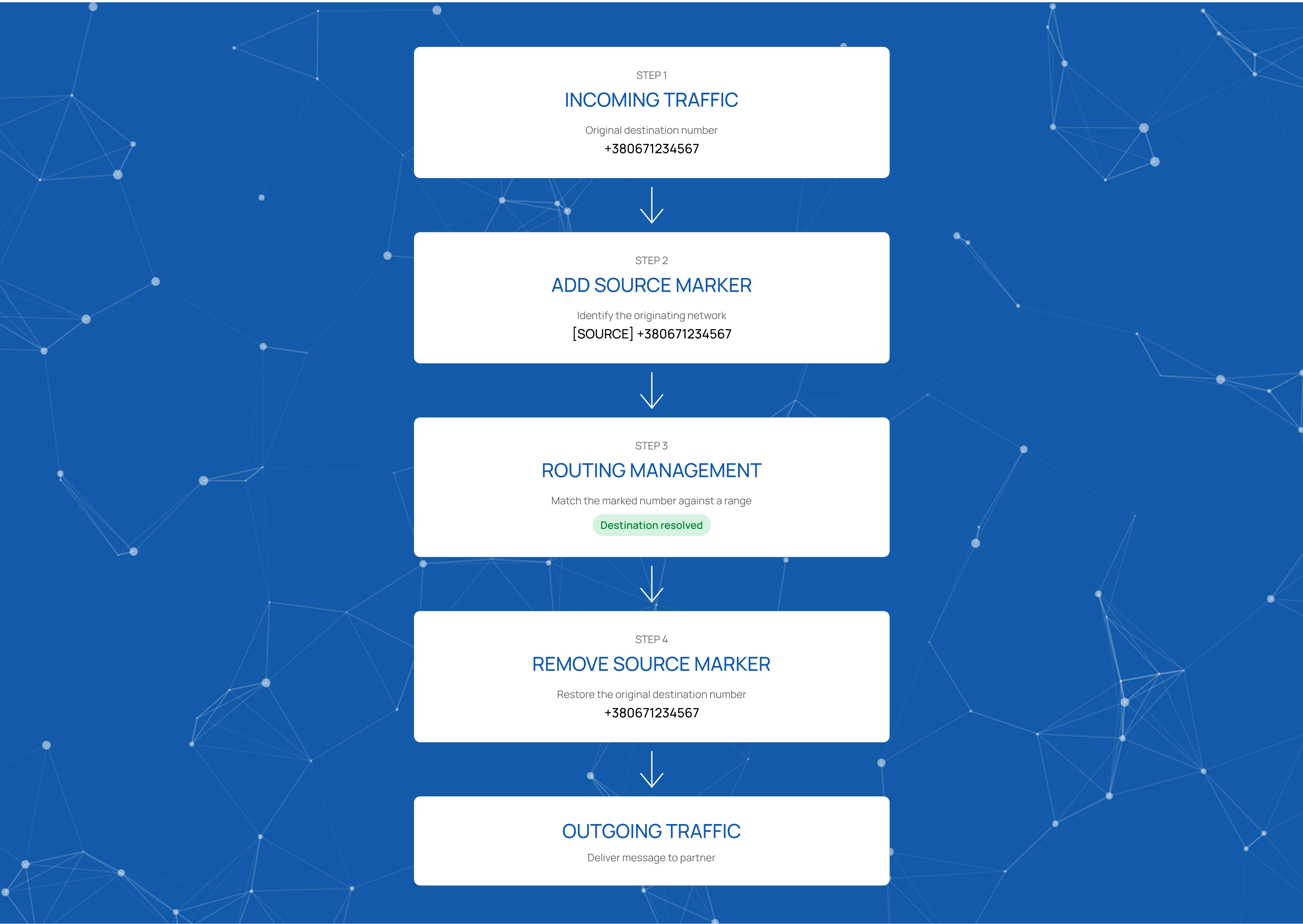
Without the rules that add and remove the marker, the entry functions as an ordinary prefix range.
Ported Numbers
Ported Numbers contain routing entries for exact phone numbers.
The most common use case is Mobile Number Portability (MNP). When a subscriber changes operators but keeps their number, an entry can route that number to its new network.
The same mechanism supports number allocations. For example, a DID assigned to a specific client can be registered here and routed to that client.
Each entry associates one exact phone number with its destination.
National and International Number Formats
Numbers can arrive in either national or international format. If a network accepts both formats, corresponding entries must be created for both in Ranges and Ported Numbers.
For example:
Ranges:
-
+38097 -
097
Ported Numbers:
-
+380971234567 -
0971234567
Routing Stats
Routing Stats shows the number of routing resolution queries executed over a selected period.
The view can be filtered by:
-
Period — selects the reporting interval.
-
Start Date — specifies the beginning of the selected period.
-
Mode — defines how the data is retrieved.
The main chart, Routing Resolving, displays the number of resolution queries.
REST API
The REST API provides programmatic access to the same routing data available through the interface.
The API is documented in API Docs as a Swagger specification. It can be imported into external systems for implementation.
Summary
Routing Management is a small module with a focused purpose: resolving the destination network for a number. Each routing decision is handled through a single number lookup.
Start innovating with Mobius
What's next? Let's talk!