
Admins Configuration Guide
User Management and Access Control
The Administrative Users Management interface provides a centralized control plane for regulating access across the platform’s graphical User Interface (UI).
Managing these accounts is essential for maintaining a secure environment and a clear operational hierarchy for system modifications.
Account Roles and Restriction Matrix
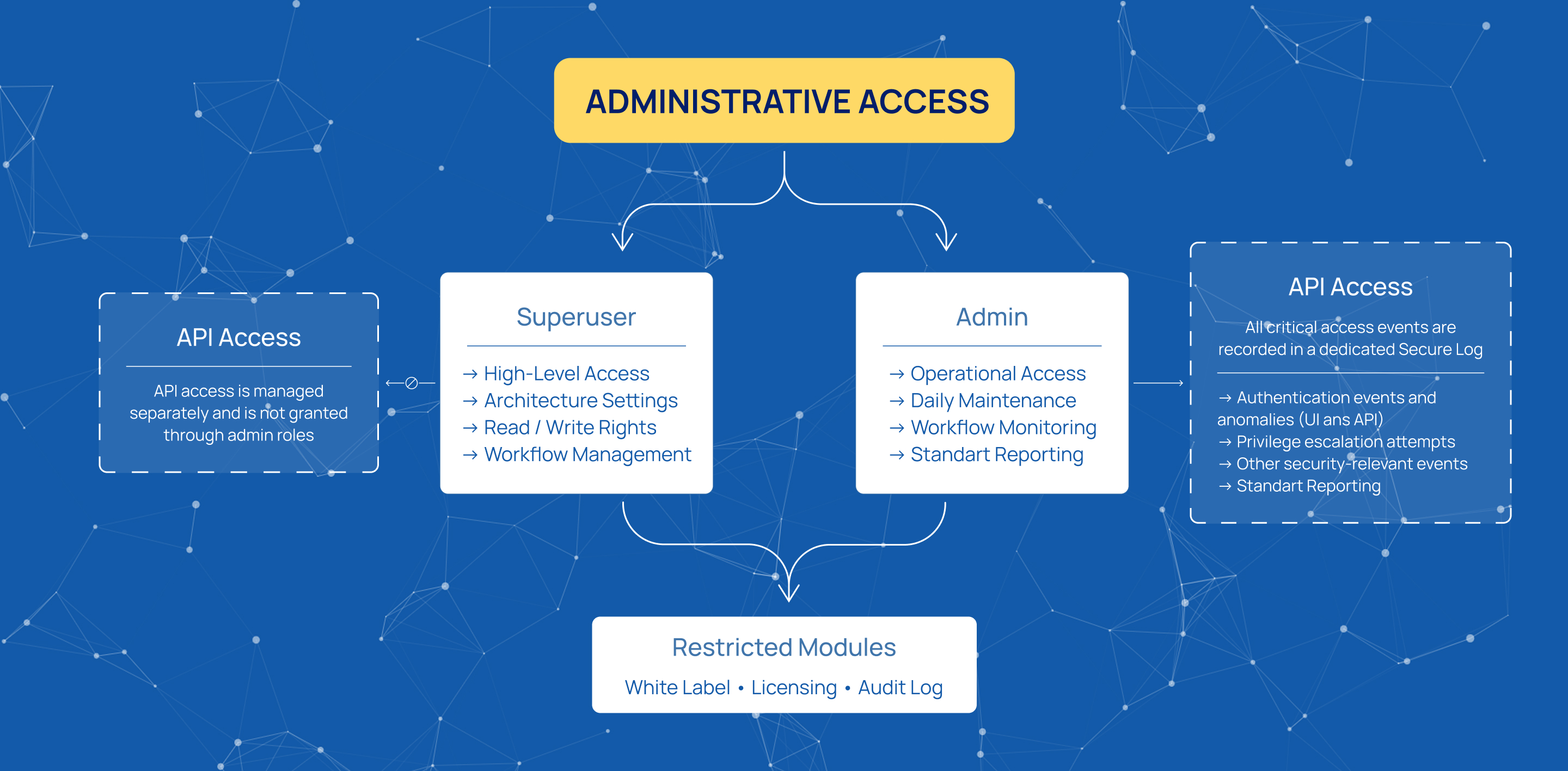
Administrative access is segmented by roles to enforce strict security boundaries.
Neither the Superuser nor the Admin role provides access to the application programming interfaces (API). These roles are limited to UI-based operations only.
Global administrative roles also do not include full system permissions. Access to White Label settings, Licensing, and the Audit Log is excluded from standard administrative profiles and requires separate authorization.
Role Definitions
Permissions are defined through a combination of global roles and module-specific access rights.
Superuser
The Superuser role provides high-level access across the platform. It includes read and write permissions for general architecture settings and baseline workflows.
Access to the following modules is excluded:
- White Label
- Licensing
- Audit Log
Admin
The Admin role is intended for operational use. It supports daily maintenance, workflow monitoring, and standard reporting.
This role does not include access to platform-level security parameters or system-critical modules.
Secure Log
All critical access events are recorded in a dedicated Secure Log.
It captures:
- authentication events and anomalies (UI and API)
- privilege escalation attempts
The Secure Log operates as an isolated registry. It is not accessible or modifiable by administrative users. This ensures an immutable forensic trail for security and compliance purposes.
Granular Role Allocation and User Provisioning
The platform supports a granular permission model that scales with deployment complexity.
User access is defined by:
- global roles (Superuser, Admin)
- module-specific permissions
Each active module includes its own permission set. This allows precise control over user capabilities per module.
User Creation and Module Permissions
Clicking Add new row starts the workflow for creating a new administrative user.
During configuration, the system provides:
- global role selection (Superuser or Admin)
- module-level access rights for each active module
This structure ensures users are assigned only the permissions required for their responsibilities.

Default Credentials
The platform is initialized with a default administrative account:
- Username:
admin - Password:
admin
These credentials must be changed immediately after installation to prevent unauthorized access.
Start innovating with Mobius
What's next? Let's talk!